
LoopVisit – Configure users and partners
Here you will find information on how to configure LoopVisit console users and partner settings
Back
LoopVisit users and partners enable you to have several user roles for your LoopVisit configuration and management console.
There are four different roles. Administrator, Receptionist, Tenant administrator and Partner.
- Administrator
Has full rights to configure all options in the management portal. - Receptionists
Have rights to typical receptionist operations.
Configure tenants (Add, remove and change), Pre-register visitors for events - Tenant admins
Can configure all options for the specific tenant they are associated with. (Change all tenant configuration settings and integrations and manually add or import employees) Manage current visitors, Import visitors for an event and get visitors log. - Partners
Have full access rights to all settings.
This is typically the reseller, operations partner or company that manages several LoopVisit installations.
Only Administrator can add or remove partners to the portal.
Administrators and receptionists are added in menuitem “Users”
To add an Administrator simply just write the email adress and click “Add”
To add a Receptionist, add the email adress anc select “Reception” the click “Add”
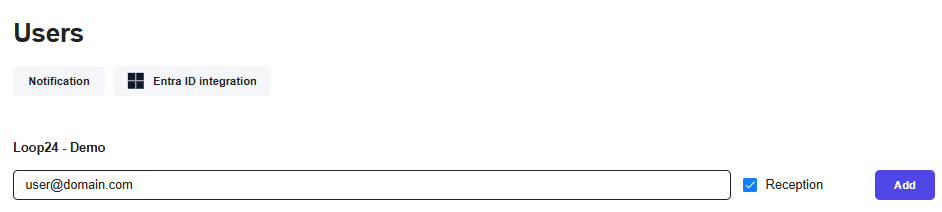
You can also add Entra ID login for Administrators under the
“Entra ID integration” option.
If you want a user or users to get notifications from the portal
(If a kiosk goes offline.)
Then add the email addresses under the “Notification” option.
——————————————————————————————————-
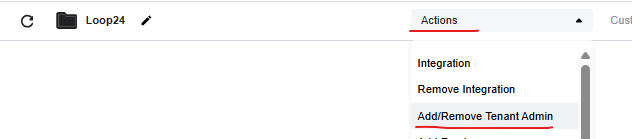
Tenant Admins are added under the “Action” button for the specific Tenant.
Select “Add/Remove Tenant Admin” and add email adress.
——————————————————————————————————-
Partners are added in the menuitem “Partners”
Here you need to add the parter ID for the partner(s) you like to give access.
Partner accounts are issued by Loop24 – so please raise a support ticket if you need a partner account.