
LoopVisit Google integration
Here you will find information on how to configure LoopBooking integration with Google Workspace
Integration data is automatically updated every 24 hours
Back

Integration with Google Workspace is done adding a group and creating an integration access
1. Configure Google Workspace group
- Log into Google Workspace admin console
(with admin account) https://admin.google.com - Select menuitem “Create groups”
- Create a group that that will contain the employees (Users) you want to integrate with LoopVisit. If you already have such group, you can skip this part.
- Add the members to the group that should be integrated with LoopVisit
- Make a note of the email adress to the group – this will be used later for the integration field: “Group-Key”
2. Configure Integration access to Google Workspace
- Log into the LoopVisit Admin console https://visit.loopvisit.com
- Select menuitem “Tenants” and select “Actions” and “Integrations” for the tenant you will integrate.
- Then select Integration type “Google Workspace” and enter the email adress for the group you created.
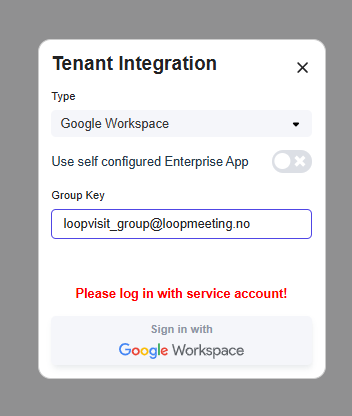
- Press “Sign in with Google Workspace” and authenticate with Admin account to enable integration.
- Authorize LoopMeeting integration and employees are fetched.