
LoopVisit LoopBooking integration
Here you will find information on how to configure LoopBooking integration in LoopVisit
Integration data is automatically updated every 24 hours
Back

Integration with LoopBooking is done by enabling the integration option in LoopBooking.
1. Enable LoopVisit integration
- Log into LoopBooking console as an administrator https://xxxxxxxx.loopbooking.no
- Select menuitem “Settings”
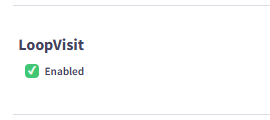
- Scroll down and enable “Loopvisit” and save
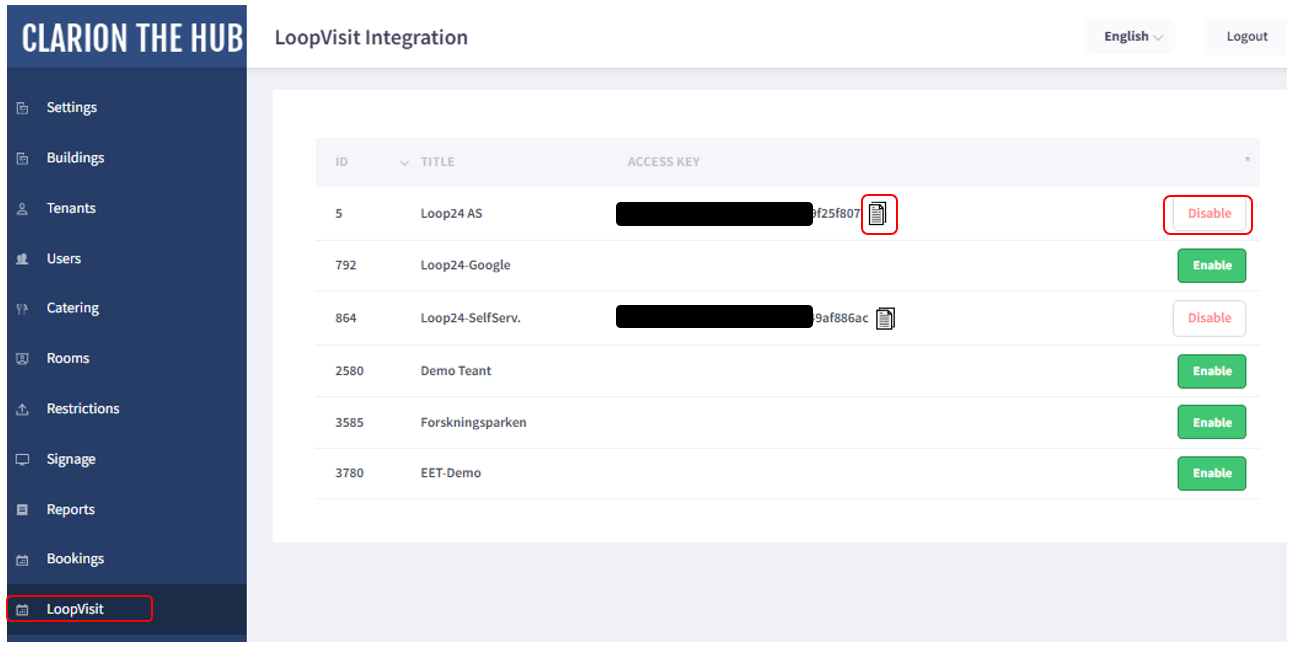
- Select the new menuitem “LoopVisit”
- Enable integration for the tenant you want to integrate
- Copy the access key to clipboard
2. Add integration parameters in LoopVisit
- Open LoopVisit configuration console https://visit.loopvisit.com
- Select menuitem “Tenants”
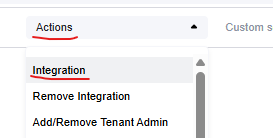
- Select “Actions” and “Integrations” on the tenant you want to integrate with LoopBooking
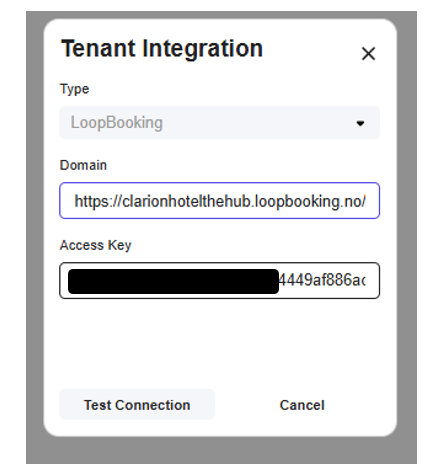
- Add the URL to your LoopBooking environment under the domain settings. https://xxxxxxxxxx.loopbooking.no
- Add the access key you copied from LoopBooking for the specific tenant.
- Press “Test connection”
- If integration is OK, you will get a blue button “Set integration” Press the buttons
Integration is then saved and employees are fetched.