Always make sure you have the latest app version installed!
General
Configure RoomConfig portal
-
Configure settings in Roomconfig portal
-
Optional: Configure Entra-ID Login to RoomConfig portal
-
Optional: Configure NFC booking on panel
Configure Reception mode

-
Step.1 Office 365 – Create service account
-
Step.2 Office 365 – Authenticate Oauth2 and MSgraph
-
Optional step 2 – Create your own Enterprise App
-
Optional – Create access policy



To connect the portal to you “on-prem” Exchange environment it is required that your Exchange environment is reachable from internet.
The EWS endpoint need to be publicly available. (https://”your_mail_server”/ews/exchange.asmx)
Here is a guide on how to configure prereq. on your “on prem” Exchange environment
Optional:
If you connect more than 15 panels to “on prem” Exchange, please adjust EWS Throttling accordingly. How to adjust adjust EWS Throttling
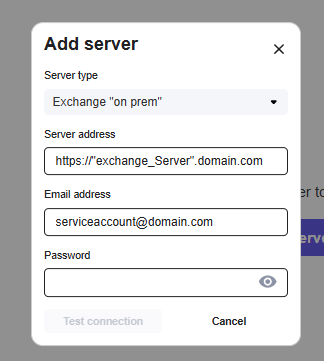
To configure the connection select server type “Exchange “on prem” and enter the Exchange server URL,
Service account username and password. Then “test server” if ok, then connect.
NOTE: The service account needs to have a mailbox and full access rights to the meetingrooms.
Example:
When you have connection, you can continune to configure the
roomconfig portal.
https://loop24.no/loopmeeting/central-configuration-roomconfig-portal/